
Where Winds Meet is a free-to-play open-world RPG experience that has cross-progression across multiple platforms. Users on Steam, Epic Games, PlayStation, as well as the official PC launcher, will be able to seamlessly continue their journey while switching between these platforms as long as they have linked the various accounts together.
So if you are looking tro make the most of the cross-progression system in this open-world game, then the guide below will help you out.
How to use Cross-progression in Where Winds Meet
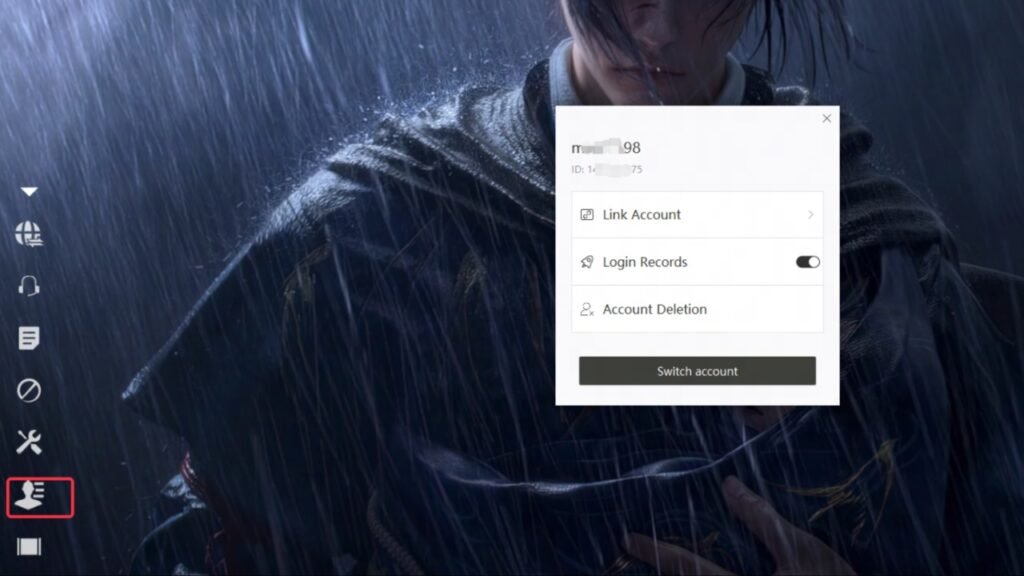
To be cross-save and progress your journey through the various platforms in Where Winds Meet, there are a couple of things that you will need to do:
Step 1: Linking your accounts
The first thing that you will need to do is to link your accounts. You will be able to do this by making your way into the Title Screen and then going into the User Center and clicking on the Link Accounts option. Here you will be able to link the accounts across the various available platforms, including Steam, Epic Games, PlayStation, and PC launcher.
Step 2: Do not create a new character before linking accounts
Make sure that you link your accounts before you set out to create a new character on a new platform. This step is necessary if you are looking to sync an existing character and data from another account.
You will not be able to link the accounts if you already have an existing character in each. So if you are primarily playing Where Winds Meet on Steam, but want to continue progression on the PS5, then you will need to log into the title screen of the game on the PS5 and then link it to a Steam account before creating a new character there.
If your PS5 already has a new character, then the accounts won’t link.
Step 3: Claim your Beta Rewards
Once you have been able to link your accounts and started the game, the next thing you will need to do is to claim your Beta Rewards if you were a Beta Test Player. You will be able to do this by:
- Log in to the same account that you used during the beta.
- If you played the Beta on Steam, then you will need to create your character on Steam.
- If you have enjoyed the beta through Facebook or Google, then you will need to log in through those accounts.
- If you played the Beta on the PlayStation, then you will need to create your character on the PS5.
- However, if you want to play the game on a platform that is different from your beta platform, you will need to link your beta platform to the new one before you create a new character.
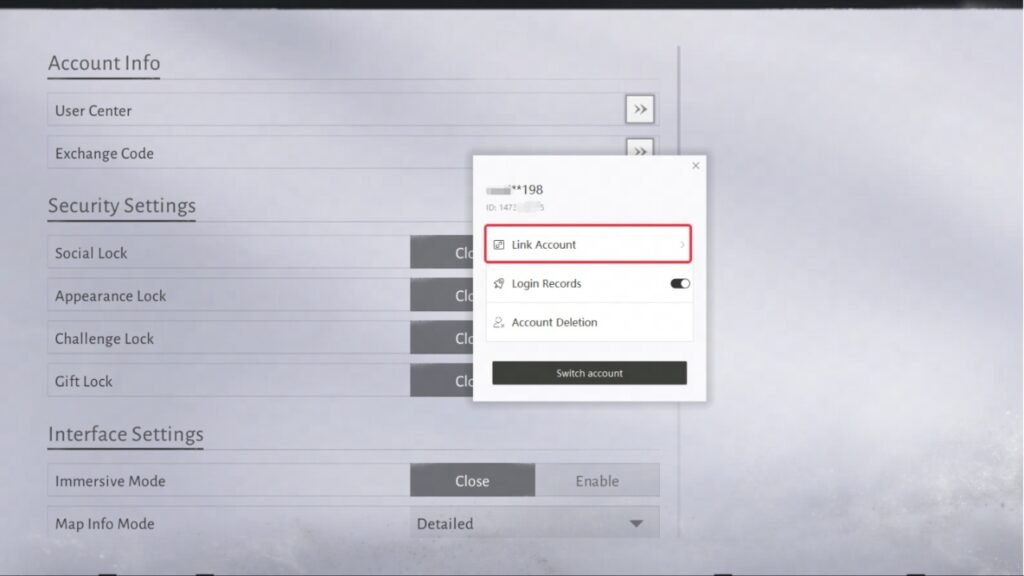
Step 4: Claiming Pre-registration and Milestone Rewards
Once you have claimed your beta rewards, you will then want to get your Pre-registration and Milestone rewards. The Milestone rewards will be directly sent to you in-game mail once you reach level 5.
Pre-registration rewards, on the other hand, are obtained after completing the main quest called “Homecoming.” Moreover, if you won the Website Pre-registration Lucky Draw, you will be able to use your Gmail or NetEase Games account on the pre-registration page. However, you will have to do it before November 30, 2025. Rewards will be sent to that account only after this date.
Moreover, if you have won a Discord Beta Community Event Reward, then you will need to contact the Discord Support Team and provide your in-game ID there to claim it.
Troubleshooting Account Linking issues in Where Winds Meet
If you are having trouble linking accounts in Where Winds Meet, you will not be able to avail its cross-progression system. So, to try and solve it, you will want to make sure that the accounts that you are trying to link do not already have existing characters in them.
If you do have characters, make sure to delete that data to complete the linking process. If your accounts still do not link, then you will want to contact the game’s Customer Support
When it comes to unlinking accounts, you will not be able to do it manually. To unlink them, you will have to contact the customer support as well.
Can you link Mobile Device accounts to PC and PS5 in Where Winds Meet?
There is no official cross-progression between the iOS-Android mobile versions of Where Winds Meet and with PC and PS5. This linking is currently only available in China, and there is yet to be a confirmation of it being made available globally.

