
Wuchang Fallen Feathers seems to be facing a lot of technical issues on PC, with many players reporting that the game is either freezing, stuttering, or crashing entirely after showing a black screen.
These are some of the most annoying issues that the game is facing at the moment. While the best fix for them will be to wait for a patch, there are a few settings that you can tinker with that can make the game playable and reduce the bugs significantly.
What is causing the Wuchang Fallen Feathers crashing and stuttering issues for PC players?
From some initial testing, it seems that the black screen and stuttering issues are caused due to the game’s poor VRAM management. There is no memory leak, but there are some sudden spikes that are seen in CPU usage when some players are trying to run the game. This is the case for most graphics cards, so it’s not just one specific set of players that are facing this issue.
How to fix PC freezing, crashing, and black screen issues for Wuchang Fallen Feathers
Here are a few steps you can take to try and fix the various technical issues that Wuchang Fallen Feathers is facing on PC:
1) Reinstall Visual C++ Redistributable and DirectX Packages
Steam will usually download and install C++ Redistributables and DirectX APIs on its own. These are the two applications which you will need to run games on a Windows PC. However, there might be cases where Steam does not do this on its own, so to fix it, you will need to manually download and install the two APIs.
You will get the latest versions of them both in the links below:
2) Close all Wuchang Fallen Feathers executables
When the game shows a black screen and crashes, there is a chance that an executable file is left running in the background. This will prevent you from launching the game again, and to fix it, you will need to close the game from the Task Manager.
To do this, you will need to press Ctrl+Shift+Esc and then open the Task Manager, then head to the Processes tab, and check the list for the Wuchang.exe file. Once you find it, right-click on it and End Task.
3) Update Your GPU Driver to the latest driver
Stuttering and crashing issues in Wuchang Fallen Feathers might be occurring due to outdated graphics drivers. Irrespective of the card you are running, you will need to patch in the latest software, and you can either do this automatically through their respective desktop apps ot manually download the drivers from the links provided below:
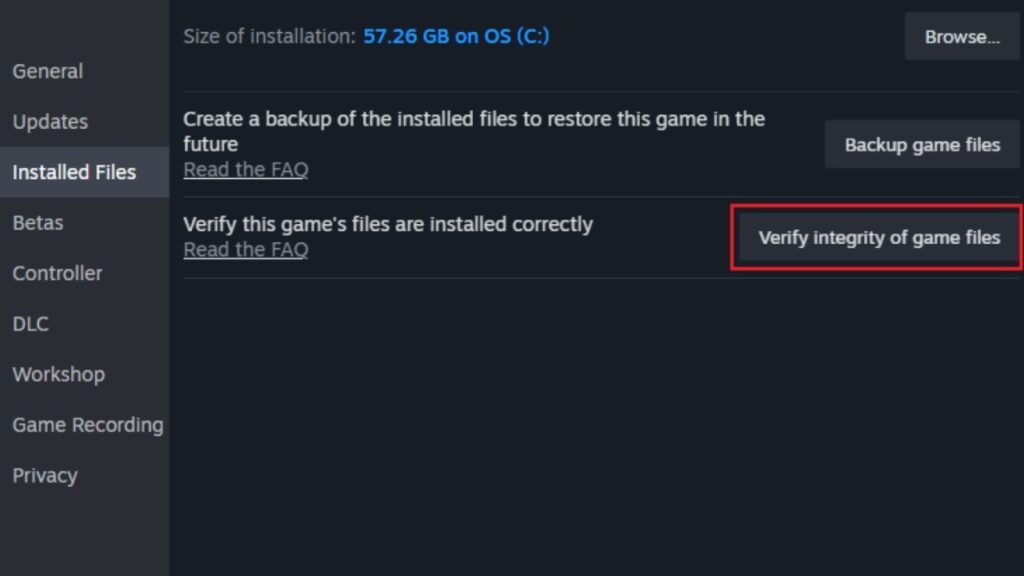
4) Verify game file integrity
During the installation process, a few corrupt files may have made it’s way to the installation directory. This can happen if something went wrong in the download process from Steam’s end, or if Windows Defender detects some game files as false positives for viruses.
To fix this, you will need to verify file integrity by heading into your Steam Library, selecting Wuchang Fallen Feathers, and then hitting the Gear/Settings icon. Here you will need to click on Properties, then Installed Files, and then finally tap Verify Integrity of game files.
This will start a process which will go over all the files in Wuchang’s installation directory and fix the ones that have been corrupted.
5) Disable ReBAR in BIOS
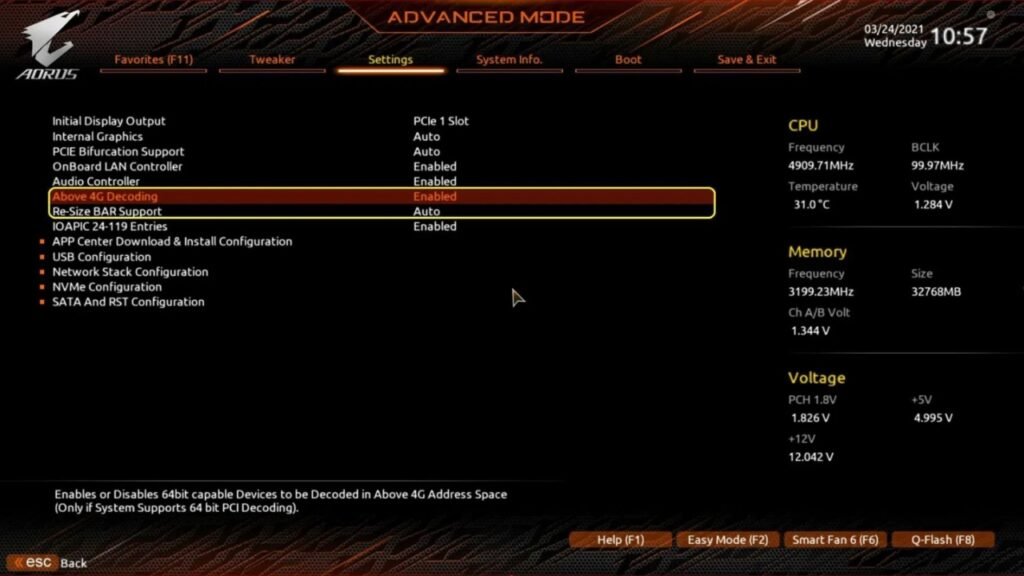
ReBAR is a neat little tool that helps improve frame rates by accessing your GPU’s VRAM in a single call. However, this only works for those games that support it, and will force crash the games for those that don’t.
So you might try and disable it to see if it helps prevent crashing and black screen in Wuchang Fallen Feathers.
To disable it, you will need to make your way to your motherboard’s BIOS and then disable both ReBAR and 4G Decoding.
6) Limit the Frame Rate
Limiting your frame rates in Wuchang Fallen Feathers can be a good solution to prevent excessive stuttering and crashing. This method especially comes in handy if you are using a VRR display.
To limit the frames in the game, you can do it from the in-game settings option. However, this will not work if you are using Frame Generation. If that is the case, you will need to use tools like the GPU’s driver utility or Afterburner to limit the frame rates that you get in the game.
Keep the frame rate at the average value of frames that you are getting. This will significantly limit the amount of stutter and freezes that you get.
7) Reduce Texture and Shadow Quality
This fix is mainly for those players who are playing Wuchang on a GPU that has less than 8 GB of VRAM. Dialing the graphics up in the game for this card will lead to several performance issues with freezes, crashing, and stuttering being the usual suspects.
So for these cards, it’s best to keep both Texture and Shadow Quality on Low. It will also let you get very stable frames.
8) Rebuild the Shader Cache
Another way of dealing with the stuttering issues will be to rebuild the Shader Cache. You can do this by either reinstalling the GPU drivers or manually deleting the shader cache from the installation directory of the game.
You will find the shader cache for Wuchanf in the Steamapps. So just locate it and manually delete them. However, do keep in mind that the game’s save data is also stored in AppData, which is separate from the installation directory, so you will not be losing out on your saves if you delete the shader cache.

